
PoligonSoft FREE to Technical Demo: Complete Casting Simulation Evaluation Guide in India
Introduction
For organizations considering metal casting simulation, the first question is often not simply:
Which software should we purchase?
A better question is:
Which simulation capabilities match our casting process and engineering problems?
A practical evaluation can begin with learning the basic workflow, understanding the available capabilities and then testing a representative engineering application.
PoligonSoft provides a FREE edition that can serve as an entry point for learning selected casting simulation capabilities, while commercial configurations provide additional simulation functionality.
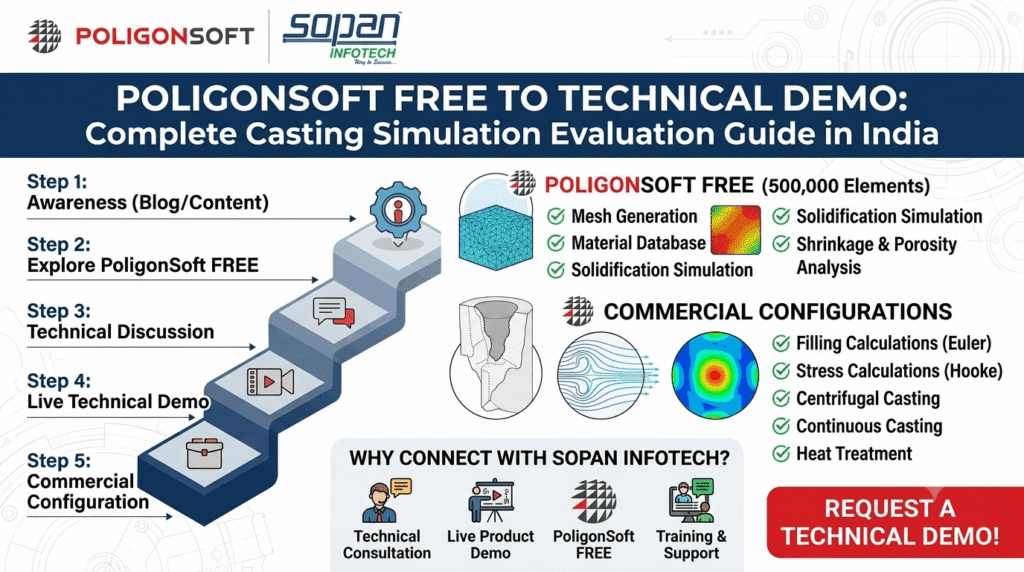
PoligonSoft FREE to Technical Demo Complete Casting Simulation Evaluation Guide in India
SOPAN Infotech can support organizations in India evaluating PoligonSoft through product discussions, technical demonstrations, training and engineering-software consultation.
What Is PoligonSoft FREE?
PoligonSoft FREE is described as a permanently free edition, rather than a time-limited trial.
The information provided for this launch identifies a 500,000-element mesh limit.
The FREE edition provides selected capabilities related to solidification and porosity analysis.
This makes it relevant for users who want to understand the fundamentals of casting simulation before evaluating broader commercial requirements.
What Can You Do With PoligonSoft FREE?
The described FREE edition includes capabilities such as:
Mesh Generation
Prepare suitable computational models for simulation.
Material Database
Work with available material information and applicable material records.
Simulation Setup
Configure simulation parameters and process conditions.
Solidification Simulation
Investigate:
- Temperature fields
- Phase fields
- Cooling
- Solidification
- Hot spots
Shrinkage and Porosity Analysis
Investigate:
- Shrinkage cavities
- Macro-porosity
- Micro-porosity
Results Visualization
Review and interpret simulation results through the visualization environment.
What Is Not Included in PoligonSoft FREE?
The provided product information states that several advanced calculation capabilities are not included in the FREE edition.
These include:
- Filling calculations
- Stress calculations
- Radiation
- Heat Treatment
- Centrifugal casting
- Continuous casting
The 500,000-element limit is another important consideration.
Therefore, users should review their actual engineering requirement before deciding whether the FREE edition is sufficient.
Who Can Use PoligonSoft FREE?
Students
A useful starting point for learning the fundamentals of casting simulation.
Educators
Can use the available functionality for educational demonstrations.
Engineers Learning Simulation
Can understand the basic workflow before evaluating advanced capabilities.
Researchers
The provided information identifies educational, academic and non-profit applications as the intended use context for the FREE edition.
Foundry Professionals
Can explore the software environment and suitable non-commercial applications within the applicable licensing conditions.
For commercial production requirements, organizations should evaluate the appropriate commercial PoligonSoft configuration.
From PoligonSoft FREE to Commercial Simulation
A commercial configuration may become relevant when an organization requires:
- Commercial production use
- Larger models
- Mold-filling simulation
- Stress/deformation analysis
- Specialized casting processes
- Advanced simulation modules
- Professional technical support
- Broader engineering workflows
The modular nature of PoligonSoft allows organizations to consider capabilities according to their simulation requirements.
How to Choose the Right Casting Simulation Software
Choosing casting simulation software should begin with the manufacturing process—not simply a list of software features.
1. Identify the Casting Process
Determine whether your organization works with:
- Sand casting
- Investment casting
- Die casting
- Vacuum casting
- Lost-foam casting
- Chill casting
- Centrifugal casting
- Continuous casting
2. Identify Your Material
Consider the alloys and mold materials used in your production environment.
The PoligonSoft material information provided for this campaign identifies categories including:
- Steel
- Cast iron
- Aluminium
- Nickel
- Titanium
- Copper
- Zinc
- Precious alloys
Mold-related materials include areas such as sand, ceramic, insulating and exothermic materials.
3. Identify the Engineering Problem
Ask what you actually need to investigate.
Filling?
Evaluate flow and filling capabilities.
Solidification?
Evaluate thermal and phase-field capabilities.
Porosity?
Evaluate shrinkage and macro-/microporosity capabilities.
Stress?
Evaluate stress and strain functionality.
Heat Treatment?
Evaluate the relevant dedicated simulation capabilities.
4. Evaluate CAD and Mesh Workflow
The simulation software should fit into the organization’s existing engineering workflow.
The provided PoligonSoft information identifies support for common 3D model formats such as IGES and STEP in the FREE edition and includes mesh-generation functionality.
5. Evaluate Model Size and Scalability
Important questions include:
- How large are your casting models?
- How detailed must the mesh be?
- How many elements are required?
- How frequently will simulations be performed?
- What calculation resources are available?
The FREE edition’s 500,000-element limit should therefore be considered during evaluation.
6. Evaluate Training and Support
Software capability alone does not guarantee successful implementation.
Organizations should also evaluate:
- Training
- Tutorials
- Application examples
- Technical support
- Demonstration capability
- Implementation guidance
This is particularly important when introducing simulation into an engineering team that has previously relied mainly on physical trials.
PoligonSoft Evaluation for Indian Foundries
For Indian organizations, a software evaluation can be structured around an actual component and process.
Relevant industries can include:
Automotive Components
Evaluate casting quality, solidification and potential defect behaviour.
Pumps
Investigate complex geometry, filling, solidification and potential shrinkage/porosity.
Valves
Study casting behaviour in components with critical sections.
Industrial Machinery
Evaluate larger and more complex cast components.
General Engineering
Apply simulation to appropriate component-development and process-development problems.
Investment Casting
Investigate complex geometries, thermal behaviour and feeding-related questions.
Why Local Technical Support Matters
When implementing engineering software, companies often require more than a product brochure.
They may need:
Requirement Understanding
↓
Software Demonstration
↓
Application Evaluation
↓
Training
↓
Implementation Support
↓
Engineering Application
SOPAN Infotech can support organizations evaluating PoligonSoft as part of its broader CAD/CAM/CAE and engineering-solutions portfolio.
How to Request a PoligonSoft Technical Demo
A technical demonstration becomes more useful when it is connected to a real engineering requirement.
The evaluation can begin by understanding:
1. Component
What are you casting?
2. Material
Which alloy are you using?
3. Process
Which casting process are you using?
4. Problem
What are you trying to investigate?
For example:
- Filling
- Solidification
- Shrinkage
- Porosity
- Hot spots
- Stress
- Deformation
5. Expected Outcome
What engineering decision do you want simulation to support?
What Information Should You Prepare?
For a meaningful technical discussion, organizations should prepare available information such as:
Component
3D CAD model where appropriate.
Material
Alloy name or relevant composition information.
Mold
Mold material and applicable information.
Pouring Temperature
Actual or estimated value.
Mold Temperature
Where applicable.
Filling Time
Actual or estimated process information.
Engineering Objective
A clear explanation of the problem you want to investigate.
The more representative the information, the more useful the technical discussion can be.
PoligonSoft Free Simulation Evaluation
The official PoligonSoft information provided for this campaign also identifies a free simulation request service.
The stated service requests a model and process details and indicates that results can be delivered within 3–7 business days, subject to acceptance of the request.
The free simulation is positioned as a technical demonstration and does not include process-optimization recommendations.
For more detailed engineering requirements, organizations can discuss applicable engineering services separately.
Frequently Asked Questions
Is PoligonSoft FREE really free?
The provided product information describes PoligonSoft FREE as a permanently free edition with selected functionality and a 500,000-element limit.
Can PoligonSoft FREE simulate filling?
The FREE edition can configure filling parameters, but the provided information states that it does not perform Euler filling calculations.
Can PoligonSoft FREE analyze stress and deformation?
No. The provided information identifies stress calculations as functionality available through the applicable commercial Hooke solver rather than the FREE edition.
Can PoligonSoft simulate porosity?
Yes. The applicable solidification/porosity capabilities include macro- and microporosity analysis and shrinkage-related investigation.
Can I request a PoligonSoft simulation?
A free simulation request service is identified in the provided PoligonSoft information, subject to acceptance and its applicable terms.
Who should request a PoligonSoft demo?
Foundry owners, casting engineers, CAE engineers, production engineers, quality teams and R&D professionals can request an evaluation when they have a relevant casting application to investigate.
Conclusion
Selecting casting simulation software should be based on the actual engineering problem, casting process, material, component complexity and required simulation capabilities.
PoligonSoft FREE provides an accessible starting point for learning selected solidification and porosity-related simulation workflows, while commercial modules extend the platform into areas such as filling, stress and specialized casting processes.
For Indian foundries and manufacturers evaluating casting simulation, a practical technical demonstration based on a representative component can provide much more value than a generic software presentation.
Have a Casting Challenge? Let’s Solve It Together.
Discover how PoligonSoft can support your casting simulation and engineering workflow with SOPAN Infotech.
Whether you are looking to investigate filling, solidification, hot spots, shrinkage, porosity, stress or deformation, our team can help you understand the appropriate simulation approach for your application.
Why Connect With SOPAN Infotech?
- Technical Consultation — Discuss your casting process and engineering requirements.
- Live Product Demonstration — Explore PoligonSoft with a practical application.
- PoligonSoft FREE — Start learning and evaluating selected simulation capabilities.
- Application Evaluation — Discuss your component, material and casting process.
- Training & Support — Build simulation knowledge within your engineering team.
- Engineering Solutions — Connect your CAD/CAM/CAE and manufacturing requirements.
Start Your PoligonSoft Journey Today
Have a component or casting defect you want to investigate?
👉 Request a Technical Demo | Explore PoligonSoft FREE | Talk to Our Technical Team
Metal Casting Simulation for Smarter Engineering Decisions
For assistance : 📞 +91 9727910606 | 📧 info@sopaninfotech.com | 🌐 www.sopaninfotech.com